
域名解析
在配置好nginx后,我们可以通过公网的ip地址打开网站,但此时还不能通过域名解析到服务器,还需要将域名解析到服务器
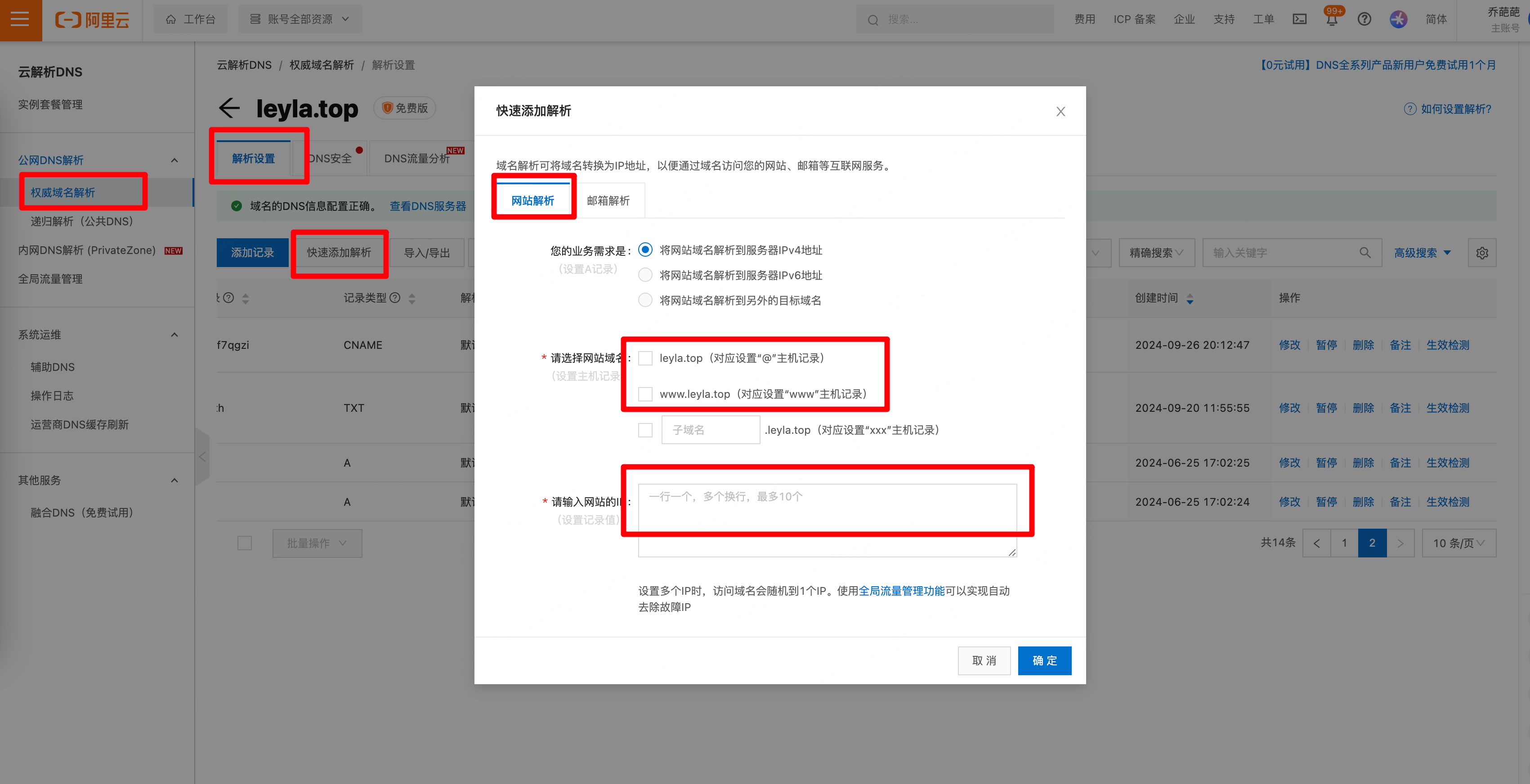
解析完成后,可以通过http协议+域名打开网站,比如我的是:http://leyla.top/
ssl证书配置
如果想要通过https协议打开网站 ,比如通过https://leyla.top/ 打开网站,并且输入http://leyla.top/ 自动跳转到 https 协议,还需要配置ssl证书。
申请证书
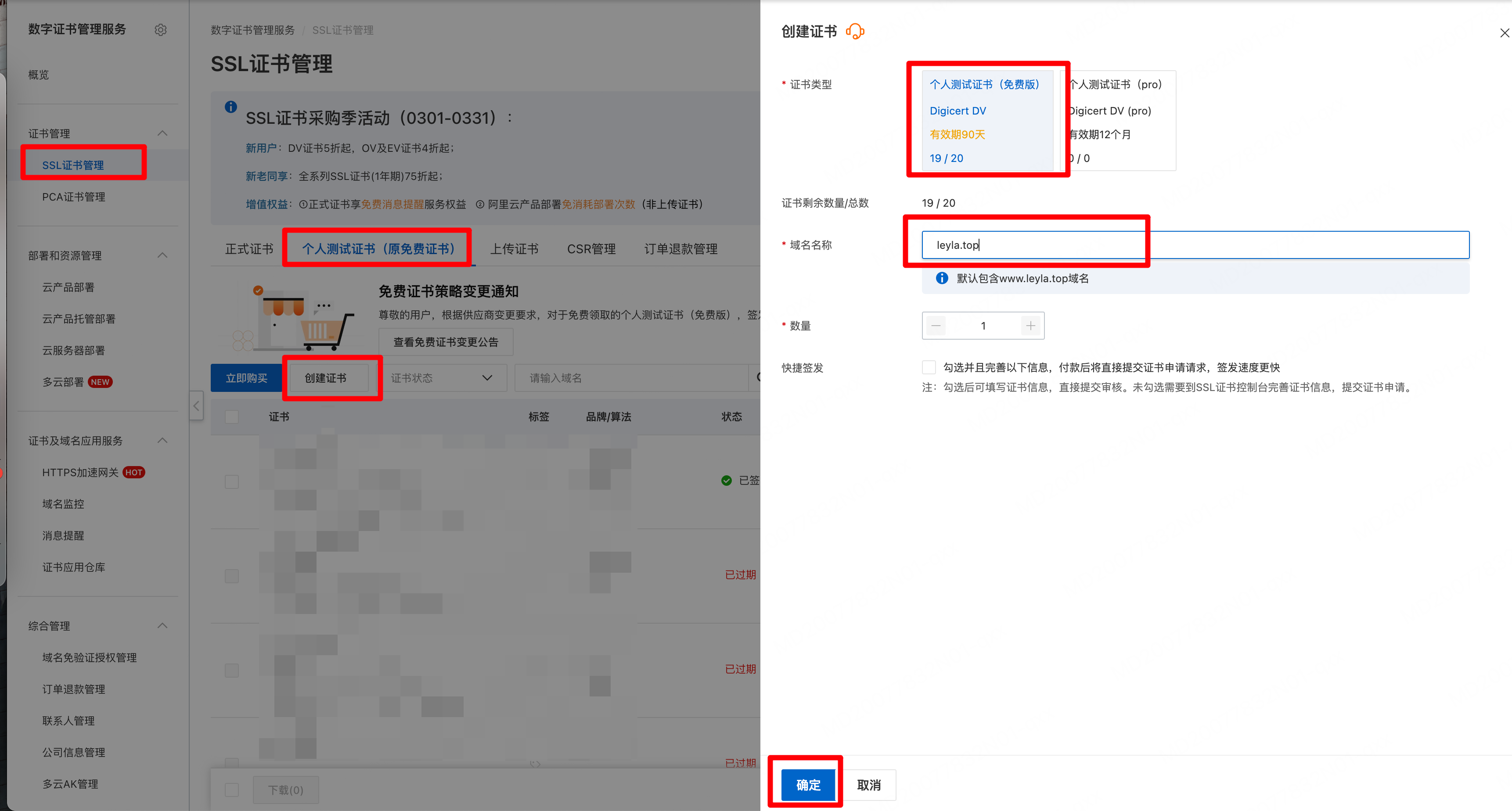
首先,需要去阿里云申请nginx证书,我这边使用的是个人免费版测试证书,每3个月需更换一次。证书审核很快,大概几分钟。
下载证书
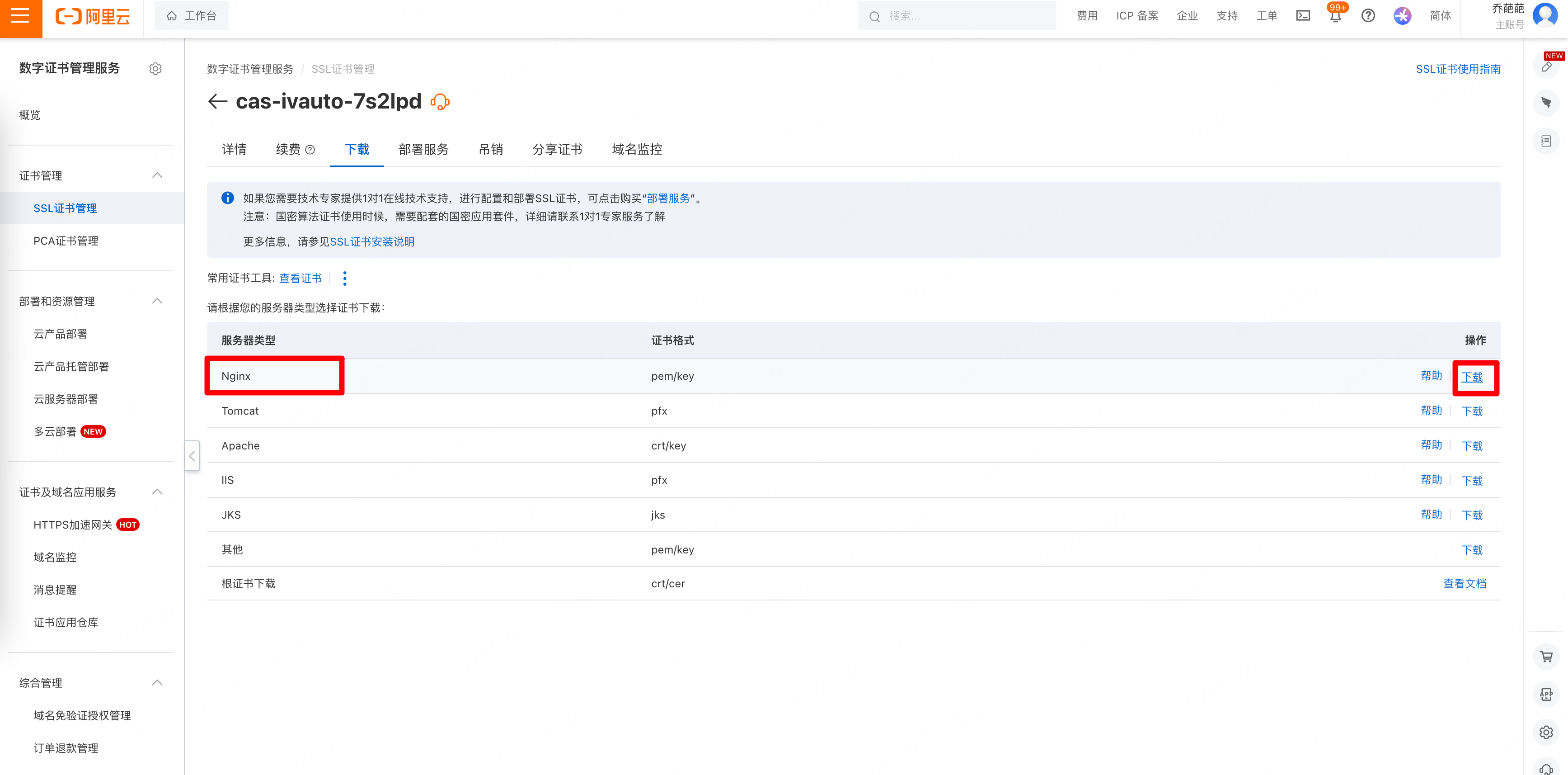
接下来就是下载证书,我用的nginx,所以下载nginx证书。下载后解压会得到一个leyla.top.pem和一个leyla.top.key文件;
上传证书到服务器
下一步是要把pem和key放到服务器中,我的nginx路径是 /etc/nginx/,所以我在nginx路径下建了一个ssl文件夹,用于存放证书/etc/nginx/ssl/,然后把下载下来的pem和key文件,通过ssh客户端,放到服务器中的/etc/nginx/ssl/目录下;
修改nginx配置文件
截止到目前我的nginx目录如下:
├── conf.d
│   └── default.conf
├── fastcgi_params
├── mime.types
├── modules -> ../../usr/lib64/nginx/modules
├── nginx.conf
├── scgi_params
├── ssl
│   ├── leyla.top.key
│   └── leyla.top.pem
└── uwsgi_params我要修改的是/etc/nginx/conf.d/default.conf
- 修改前:
server {
    listen       80;
    #access_log  /var/log/nginx/host.access.log  main;

    location / {
        root   /usr/share/nginx/html/current;
        index  index.html index.htm;
    }

    #error_page  404              /404.html;

    # redirect server error pages to the static page /50x.html
    #
    error_page   500 502 503 504  /50x.html;
    location = /50x.html {
        root   /usr/share/nginx/html;
    }

    # proxy the PHP scripts to Apache listening on 127.0.0.1:80
    #
    #location ~ \.php$ {
    #    proxy_pass   http://127.0.0.1;
    #}

    # pass the PHP scripts to FastCGI server listening on 127.0.0.1:9000
    #
    #location ~ \.php$ {
    #    root           html;
    #    fastcgi_pass   127.0.0.1:9000;
    #    fastcgi_index  index.php;
    #    fastcgi_param  SCRIPT_FILENAME  /scripts$fastcgi_script_name;
    #    include        fastcgi_params;
    #}

    # deny access to .htaccess files, if Apache's document root
    # concurs with nginx's one
    #
    #location ~ /\.ht {
    #    deny  all;
    #}
}-
修改内容
- 增加一个server,端口号指向443,配置证书和ssl协议相关,指定location
- 将80的server,重定向到https
-
修改后:
server {
    listen       80;
    # 置HTTP请求自动跳转到HTTPS
    server_name  leyla.top;
    #将所有HTTP请求通过rewrite指令重定向到HTTPS。
    rewrite ^(.*)$ https://$host$1;

    #access_log  /var/log/nginx/host.access.log  main;

    location / {
        root   /usr/share/nginx/html/current;
        index  index.html index.htm;
    }

    #error_page  404              /404.html;

    # redirect server error pages to the static page /50x.html
    #
    error_page   500 502 503 504  /50x.html;
    location = /50x.html {
        root   /usr/share/nginx/html;
    }

    # proxy the PHP scripts to Apache listening on 127.0.0.1:80
    #
    #location ~ \.php$ {
    #    proxy_pass   http://127.0.0.1;
    #}

    # pass the PHP scripts to FastCGI server listening on 127.0.0.1:9000
    #
    #location ~ \.php$ {
    #    root           html;
    #    fastcgi_pass   127.0.0.1:9000;
    #    fastcgi_index  index.php;
    #    fastcgi_param  SCRIPT_FILENAME  /scripts$fastcgi_script_name;
    #    include        fastcgi_params;
    #}

    # deny access to .htaccess files, if Apache's document root
    # concurs with nginx's one
    #
    #location ~ /\.ht {
    #    deny  all;
    #}
}

server {
     #HTTPS的默认访问端口443。
     #如果未在此处配置HTTPS的默认访问端口,可能会造成Nginx无法启动。
     listen 443 ssl;

     #填写证书绑定的域名。多域名配置示例:server_name example.com www.example.com doc.example.com;
     server_name leyla.top;

     #填写证书文件绝对路径
     ssl_certificate /etc/nginx/ssl/leyla.top.pem;
     #填写证书私钥文件绝对路径
     ssl_certificate_key /etc/nginx/ssl/leyla.top.key;

     ssl_session_cache shared:SSL:1m;
     ssl_session_timeout 5m;

     #自定义设置使用的TLS协议的类型以及加密套件(以下为配置示例,请您自行评估是否需要配置)
     #TLS协议版本越高,HTTPS通信的安全性越高,但是相较于低版本TLS协议,高版本TLS协议对浏览器的兼容性较差。
     ssl_ciphers ECDHE-RSA-AES128-GCM-SHA256:ECDHE:ECDH:AES:HIGH:!NULL:!aNULL:!MD5:!ADH:!RC4;
     ssl_protocols TLSv1.1 TLSv1.2 TLSv1.3;

     #表示优先使用服务端加密套件。默认开启
     ssl_prefer_server_ciphers on;


    location / {
        root   /usr/share/nginx/html/current;
        index  index.html index.htm;
    }
}
重启nginx
systemctl reload nginx.service重启nginx后,在浏览器输入leyla.top, 会自动重定向到https://leyla.top/
在浏览器也可以输入 公网ip,也会自动重定向到https://公网ip,只不过会提示不安全
自动更新ssl证书
个人免费证书只能用90天,所以每90天需要更换一次,要么手动,要么自动。 懒人是不可能手动的,永远也不可能手动,所以下一篇:使用 acme.sh 自动续签阿里云 SSL 证书